


ESV Bible
4.74.06K Reviews
App Specs
- Version
- 5.2.9
- Updated On
- License
- Free
- Downloads
- 1,000,000+
- Developer
- Crossway
- Categories
- Books & Reference
- Platform
- Android, iOS
Screenshots

 Analysis by AppCompare
I like a Bible app best when it helps me return to the text without turning a quiet reading moment into a complicated project. ESV Bible has a clear focus: it puts the English Standard Version at the center, with reading plans, audio and study tools around it. That makes it most useful as a steady daily reading companion, rather than as a broad reference library for comparing many translations. I would recommend it to someone who already wants to read the ESV and values having more than a plain digital text in one place.
A focused reading companion
The app comes from Crossway and sits in the books and reference category. It is free to install, has an Everyone age rating, and has reached over one million installs. Its average rating is 4.6 from around nineteen thousand ratings, which suggests that many readers find the focused approach worthwhile. I would treat those figures as context, not as a substitute for checking whether the ESV itself suits your reading habits.
That translation-specific focus is both the app’s clearest strength and an important choice to make before you settle in. If the ESV is the version you use at church, in a study group or for personal reading, the app can keep your routine close to the wording you already know. If you regularly compare several translations side by side, a multi-translation Bible app may suit you better. In my view, knowing which of those readers you are matters more than the number of tools on the screen.
What makes it useful in ordinary reading
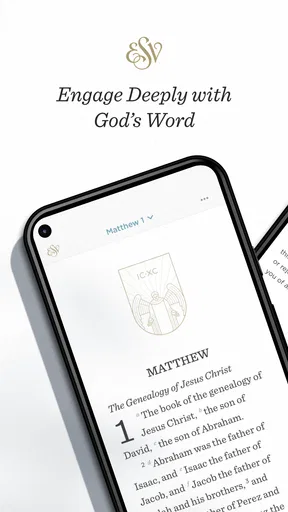
The interface feels approachable rather than crowded. When I open a Bible app, I want the passage to be the main event, and this one’s straightforward layout helps with that. Adjusting the text size can make a longer reading more comfortable, while a dark appearance is useful when I read in the evening. Those options are practical rather than transformative, but small comforts make it easier to keep coming back.
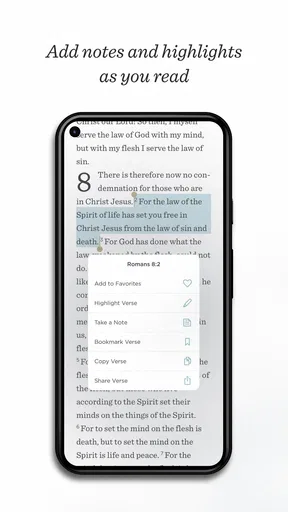
Highlights and notes are more valuable when they support a repeatable habit. One useful way to work is to mark only a few lines that raise a question or connect with something you are studying, then add a short note while the context is fresh. That keeps annotations from becoming a pile of colored verses with no explanation. I would use the tools to record what I want to revisit, not as a replacement for a separate study notebook if I need a detailed, organized research archive.
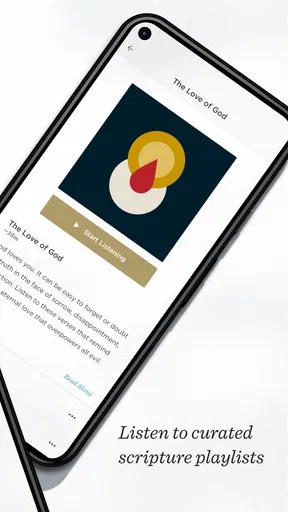
The audio option gives the app a different role from a conventional reading-only Bible. Listening can fit a walk, a household task or a commute when opening a screen is inconvenient. I find audio especially helpful for hearing the shape of a passage across several chapters, rather than stopping at each verse. On the other hand, listening is not ideal when I need to inspect a particular phrase carefully, take precise notes or move back and forth through a passage. For that, reading on screen is more deliberate.
Search, plans and a workable routine
Search is useful when I remember a phrase or need to get back to a passage quickly. A sensible workflow is to use it to locate a reference, read the surrounding section and then save a highlight or note only if there is something worth keeping. Looking at a verse in isolation can make it easy to miss the argument or story around it, so I would treat search as a doorway into the passage rather than as the whole study process.
Worth Reading Before You Choose

EA SPORTS FC Mobile 26 Is a Bigger Football Game, but It Takes Time

Flipboard Shows What News Apps Must Do Beyond the Feed

Switching to Android Auto Means Rethinking Your Driving Routine

Google Calendar Makes a Crowded Week Easier to Manage

Ludo King Makes the Most of the Minutes Between Plans

Baby Panda World Brings Quick Play to Modern Phones, but Its Game Library Feels Busy
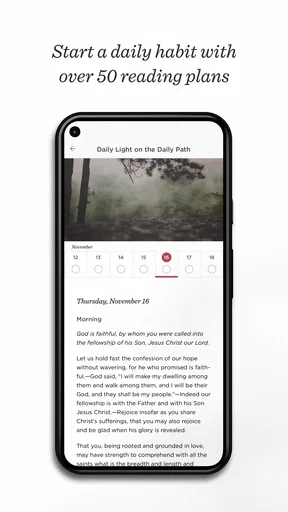
Reading plans can make a large book feel more manageable by giving each session a defined place to begin. They are particularly helpful if you tend to open a Bible, wonder where to start, and close it again without reading much. I would choose a plan that fits the time I can realistically give it, instead of treating missed days as a reason to abandon the routine. The point is to make returning easier, not to turn reading into another streak to protect.
For example, I can picture opening a plan over breakfast, reading the day’s passage before the day gets noisy, and saving one question in a note to revisit later. On a busy evening, I might listen instead of trying to concentrate on a screen. That kind of flexibility is where the combination of text, plans and audio makes sense: the app supports different moments without requiring every session to look the same.
Where it fits among Bible apps
Compared with a basic ebook or a simple Bible reader, this app brings plans, audio and study tools into the reading experience. Compared with a reference-focused app built around multiple translations and extensive cross-referencing, its appeal is more concentrated: it is a practical home for readers who want the ESV. I would not choose it solely because it is free if my main goal were detailed original-language research, broad translation comparison or a carefully managed collection of scholarly resources.
That distinction also helps answer whether it works for beginners. A new reader can benefit from a guided plan and an uncluttered way into the text, but the app cannot decide which book or approach will make sense for that person. I would suggest starting with a manageable plan and using notes to record questions rather than trying to understand everything at once. Readers who need a study leader, commentary or a structured course will still want those supports outside the app.
Trade-offs worth knowing before you rely on it
Some available items involve in-app purchases, with listed prices ranging from $3.99 to $39.99 per item. The app is free to start, but I would look carefully at what a particular paid item contains before buying it and decide whether it adds something I will actually use. The presence of optional purchases does not make the basic reading experience unsuitable, though it does mean that “free” should not be taken to mean that every resource is included at no cost.
There is also a difference between convenience and depth. A phone is excellent for carrying a passage everywhere, searching quickly and fitting a short reading into a spare moment. It is less comfortable for extended study if I am switching between a long text, notes and other reference materials. For a focused devotional session, that trade-off is easy to accept; for a serious study session, I may prefer a larger screen, a printed Bible or a dedicated reference tool alongside it.
The app’s current version is 5.2.9, and it requires Android 8.0 or later. That makes the system requirement worth checking before planning to use it on an older device. More generally, I would test the reading and listening routines that matter most to me early on, rather than building a habit around an assumption about how I will use the app. A good fit is the one that works naturally with my device, schedule and preferred way of engaging with scripture.
Who I would recommend it to
I would point regular ESV readers toward this app if they want one place for the text, a guided plan, audio listening and lightweight annotations. It is also a reasonable starting point for someone who wants to build a simple reading habit and would rather be guided than browse without direction. The reminders can help some people remember to return, although I would keep them gentle and avoid letting an alert become the measure of whether a reading practice is meaningful.
I would suggest a different option to readers who depend on comparing translations, need advanced research features, or want a large study collection without considering separate purchases. It may also be less appealing to someone who prefers paper and finds phone notifications or screen time distracting. Those are not failures of the app so much as differences in what a reader needs; choosing a tool that encourages attention matters more than choosing the one with the longest feature list.
First Impressions
When you first open the ESV Bible app, it greets you with a clean and straightforward interface. It’s not cluttered with unnecessary bells and whistles, which is always a plus in my book. The design is intuitive, making it easy even for those who aren’t tech-savvy to navigate through the app. Right off the bat, it feels like a digital sanctuary, ready to guide you through your daily devotions.
Features That Stand Out
One of the first things I noticed was the app's ability to let you customize your reading experience. You can adjust the font size and choose between a light or dark mode, depending on your preference. For night owls like me, the dark mode is a lifesaver. And if you're someone who likes to annotate, the app allows you to highlight verses and add notes. It’s like having your Bible study tools rolled into one handy app.
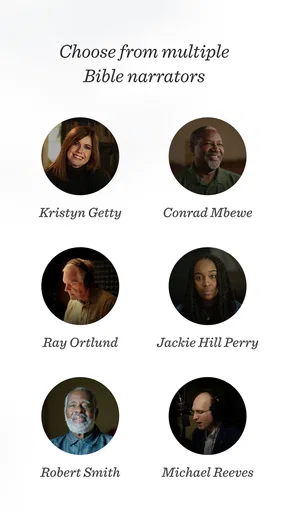
Another feature that caught my attention is the audio Bible. Sometimes, I just want to sit back and listen, especially during long commutes or when I’m winding down for the night. The narration is clear and well-paced, making it a pleasant experience. It’s like having a personal Bible narrator right in your pocket.
Getting into the Word
The search function is robust, which is essential when you're trying to find a specific verse or passage. You can search by book, chapter, or verse, and it responds quickly. This functionality is crucial for those moments when you need a particular scripture on the fly.
Daily reading plans are another highlight. Whether you’re new to Bible reading or have been at it for years, these plans can guide you through the scriptures in a structured manner. There’s something quite satisfying about ticking off each day's reading and seeing your progress over time.
Community and Connectivity
If you’re someone who enjoys sharing insights and discussing scripture, the app provides options to share verses directly to social media or via messaging apps. It’s a nice way to stay connected with friends or family who are also diving into the Word. Plus, being able to share a meaningful verse can sometimes spark interesting conversations.
The Little Extras
One thing that pleasantly surprised me was the inclusion of additional resources, like devotionals and articles. These resources offer deeper dives into specific topics or scriptures, which is perfect for those days when you want to study more intensively. It’s like having a mini library at your disposal.
Lastly, the app ensures that you stay on track by sending gentle reminders for your daily readings. It’s a subtle nudge that helps keep your spiritual discipline in check.
Final Thoughts
Overall, the ESV Bible app is a fantastic companion for anyone looking to deepen their understanding of the Bible. It combines functionality with simplicity, making it accessible for all users. Whether you’re a seasoned Bible reader or just starting out, this app has something to offer.
So, if you're looking for a new way to engage with the scriptures, give this app a try. Who knows? It might just become your go-to tool for all things Bible-related. Happy reading!
My verdict
My recommendation is strongest for people who already prefer the ESV and want a convenient way to read or listen regularly. Its simple presentation, plans and annotation options give a reading habit useful support without making the app feel like a research workstation. The trade-off is that readers seeking broad translation comparison or deeper reference work may be happier with a different Bible tool, while the optional paid resources deserve a deliberate look before purchase. For a focused, everyday companion, though, it is an appealing place to begin and return to.
Pros
- User-friendly interface for easy navigation.
- Offline access to scriptures available.
- Comprehensive search functionality.
- Multiple translations for comparison.
- Highlighting and note-taking features.
Cons
- Limited audio options for some versions.
- Requires account for certain features.
- Ads can be intrusive at times.
- No customization for font size.
- In-app purchases for additional content.
FAQs for ESV Bible
What features does the ESV Bible app offer?
The ESV Bible app provides a comprehensive set of features including offline access to the full English Standard Version text, cross-references, and audio narration. Users can bookmark passages, create notes, and highlight text. The app also offers daily reading plans and customizable reading modes to enhance your study experience.
Is the ESV Bible app free to use?
Yes, the ESV Bible app is free to download and use. It offers a robust set of features without any cost. However, there may be optional in-app purchases or subscriptions for additional resources such as study guides, commentaries, or enhanced audio features that can enrich your experience.
Can I access the ESV Bible offline?
Absolutely. One of the key features of the ESV Bible app is its offline accessibility. Once the app is downloaded, you can access the full text of the Bible without needing an internet connection. This makes it convenient for reading and studying anywhere, anytime, without worrying about connectivity issues.
How user-friendly is the ESV Bible app interface?
The ESV Bible app is designed with user-friendliness in mind. Its clean and intuitive interface allows for easy navigation between books, chapters, and verses. The search function is robust, and customizable settings for text size and display modes cater to individual preferences, ensuring a seamless user experience.
Does the ESV Bible app support multiple devices?
Yes, the ESV Bible app supports synchronization across multiple devices. By creating an account, users can sync their bookmarks, notes, and reading plans across smartphones and tablets, whether on Android or iOS. This ensures continuity and a personalized experience regardless of the device being used.


